Hello World
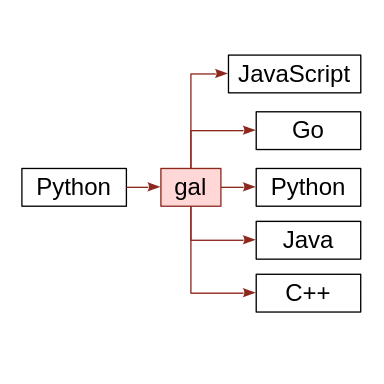
gal stands for general abstract language. The gal programming language is designed for translation. In this chapter, we will write the "Hello World" program in gal. Then we will translate it into five different languages. Finally, we will take the "Hello World" program in Python, and we will use gal to translate it into JavaScript. At the end of this chapter, you will have experienced some of the translation capabilities of gal.
Hello World in gal
module Hello
{
    main
    {
        say "Hello, World!";
    }
}
This is the "Hello World" program in gal. gal is designed to be easy to translate, so the gal syntax is very simple. The module statement creates a module called "Hello". A module is a kind of program. The main statement defines the main thing that will happen when we run the program. The say statement causes the program to say "Hello, World!".
Python
module Hello
{
    main
    {
        say "Hello, World!";
    }
}
Let's translate this gal program into python.
$ galpy hello.gal hello.pyThe galpy command translates a gal program into Python. You have to install gal for that to work. This is a simple program, so we can use galpy directly. The galpy command didn't print any output, which means there were no errors. Let's see what the new Python program looks like.
$ cat hello.py
# module: Hello
if __name__ == '__main__':
    print('Hello, World!')
# module: Hello
if __name__ == '__main__':
print('Hello, World!')This is the same program, translated into the Python syntax. Python has a different way of handling modules, defining the main part of the program, and printing output. The syntax is different, but the meaning is the same. Now let's run the program to see if it works.
$ python3 hello.py
Hello, World!So we ran the program and it printed, "Hello, World!". Exactly what we expected. You have to install Python for that to work.
JavaScript
module Hello
{
main
{
say "Hello, World!";
}
}Let's translate this gal program into JavaScript.
$ galjs hello.gal hello.jsThe galjs command translates a gal program into JavaScript. It doesn't produce output, so it worked. Let's see what the new JavaScript program looks like.
$ cat hello.js
// module: Hello
// main program
console.log('Hello, World!');// module: Hello
// main program
console.log('Hello, World!');This is the same program, translated into JavaScript. It has comments about module and main, and it logs "Hello, World!" to the console. Once again, let's run the program to see if it works.
$ node hello.js
Hello, World!We ran it and it printed, "Hello, World!". Just as expected. You have to install nodejs for that to work.
Go
module Hello
{
main
{
say "Hello, World!";
}
}Now let's translate this gal program into Go.
$ galgo hello.gal hello.goThe galgo command translates a gal program into Go. Let's see how it looks.
$ cat hello.go
package main
import "fmt"
// module: Hello
func main() {
fmt.Println("Hello, World!")
}package main
import "fmt"
// module: Hello
func main() {
fmt.Println("Hello, World!")
}So in Go, a module becomes a package. It has to import fmt. There is a function named main. And it prints Hello World.
$ go build hello.goWe use 'go build' to compile the program. You have to install Go for that to work. It doesn't print any output, so it compiled without errors. Let's run it.
$ ./hello
Hello, World!And it worked.
Java
module Hello
{
main
{
say "Hello, World!";
}
}Now let's translate this gal program into Java.
$ galjava hello.gal Hello.javaThe galjava command translates a gal program into Java. Notice that I capitalized the filename 'Hello.java'. Java has expectations about the file names that you use. Let's see how it looks.
$ cat Hello.java
public class Hello {
public static void main(String[] args) {
System.out.println("Hello, World!");
}
}public class Hello {
public static void main(String[] args) {
System.out.println("Hello, World!");
}
}So in Java, a module becomes a public class. There is a static function named main. And it prints Hello World.
$ javac Hello.javaWe use 'javac' to compile the program. You have to install Java for that to work. As usual, no news is good news. Now I'll try to run it.
$ java Hello
Hello, World!It worked!
C++
module Hello
{
main
{
say "Hello, World!";
}
}Finally, let's translate this gal program into C++.
$ galcpp hello.gal hello.cppThe galcpp command translates a gal program into C++. Let's see how it looks.
$ cat hello.cpp
#include <iostream>
// module: Hello
int main() {
std::cout << "Hello, World!\n";
return 0;
}#include <iostream>
// module: Hello
int main() {
std::cout << "Hello, World!\n";
return 0;
}So in C++, a module is just a comment. There is a function named main. It has to include iostream to print something to standard output. And it prints Hello World. And it returns 0, indicating that no error occurred.
$ g++ hello.cpp -o hello2We use 'g++' to compile the program. You have to install g++ for that to work. I named it 'hello2' to avoid confusion with the earlier program we created. Once again, no news is good news. Let's run it.
$ ./hello2
Hello, World!It worked!
Python to gal to JavaScript
$ cat hello.py
# module: Hello
if __name__ == '__main__':
print('Hello, World!')# module: Hello
if __name__ == '__main__':
print('Hello, World!')Remember the Python version of Hello World that we created? Now I want to translate the Python version into JavaScript. gal can help us with that.
$ pygal hello.py hello_new.gal
pygal OK, gal3 program written to hello_new.gal
pygal is a new experimental program in gal version 3. It can read a python program and translate it into gal. The program is translated into a special Python dialect of gal.
$ cat hello_new.gal
flowerbox 'translated from python by pygal';
module Compiler
{
    class Base
    {
        constructor [variant A [null], variant B [null], variant C [null]];
    }
    main
    {
        python print 'Hello, World!';
    }
}
This program is not quite the same as the original 'hello.gal' program we created. It has a couple extra things added to it. And it uses a 'python print' statement instead of a 'say' statement. Because the translator needs to faithfully represent what the Python program is doing.
flowerbox 'translated from python by pygal';
module Compiler
{
    class Base
    {
        constructor [variant A [null], variant B [null], variant C [null]];
    }
    main
    {
        python print 'Hello, World!';
    }
}
$ fallback hello_new.gal hello_new.fallbackThis program isn't simple enough to translate directly into JavaScript. So we use the fallback gal compiler. Basically, the fallback compiler translates a gal program into a simpler gal program. Let's see what the result is.
$ cat hello_new.fallback
comment "***********************************" [line]  '* translated from python by pygal *' [line] "***********************************";
module Compiler
{
    class Base
    {
        constructor [variant A [null]] [variant B [null]] [variant C [null]];
    }
    main
    {
        say 'Hello, World!';
    }
}
There are a couple of things that changed with the fallback version of the program. The most noticeable is that the python print statement is now a say statement. Also, the flowerbox statement is now a comment statement. Now that we simplified the program with the fallback compiler, we are ready to translate it into JavaScript.
comment "***********************************" [line]  '* translated from python by pygal *' [line] "***********************************";
module Compiler
{
    class Base
    {
        constructor [variant A [null]] [variant B [null]] [variant C [null]];
    }
    main
    {
        say 'Hello, World!';
    }
}
$ galjs hello_new.fallback hello_new.jsThe galjs compiler worked. Let's look at the result.
$ cat hello_new.js
// ***********************************
// * translated from python by pygal *
// ***********************************
// module: Compiler
class Base
{
    constructor(A=null, B=null, C=null)
    {
    }

}
// main program
console.log('Hello, World!');
// ***********************************
// * translated from python by pygal *
// ***********************************
// module: Compiler
class Base
{
constructor(A=null, B=null, C=null)
{
}
}
// main program
console.log('Hello, World!');So we have a JavaScript hello world program with a couple of extra things, that were inserted by pygal and translated twice to make it into JavaScript.
$ node hello_new.js
Hello, World!
So once again, it worked.
Conclusion
In this video, we translated from gal into Python, JavaScript, Go, Java and C++. We translated from Python into gal, and then used the fallback compiler to translate the program into JavaScript. You can get gal at generalabstractlanguage.com And you can keep watching this channel for more information about gal.